
This page is part of our series to help people who buy and commission images learn about 3D rendering. It covers how real-time engines work, how they compare with offline rendering on the same room, what hardware they lean on, where they fit in an architectural project, and the book the field treats as its reference.
How does real-time rendering work?
Real-time rendering works by rasterizing the scene on the GPU and approximating expensive effects, such as bounced light and reflections, with precomputed data, screen-space tricks and limited ray tracing. Real time 3D rendering has a hard budget: Wikipedia's article on real-time computer graphics puts it at under a thirtieth of a second per image. Every step of real time rendering is built to fit inside that budget:
- Read the input. The engine takes the viewer's movement from a mouse, controller or VR headset and places the camera for the next frame.
- Cull what cannot be seen. It skips objects outside the view or hidden behind others, and swaps distant objects for simpler versions.
- Rasterize the visible triangles. The GPU projects the triangles onto the screen and keeps the nearest surface at each pixel, a process called polygon rasterization.
- Shade with shortcuts. Each pixel gets its material and light from fast approximations: shadow maps, baked or cached bounced light, and reflections from the screen or from pre-rendered environment images.
- Add traced effects where the hardware allows. On cards with ray tracing hardware, a few rays per pixel improve reflections, shadows or bounced light.
- Denoise, upscale and display. The engine cleans grain from traced effects, often renders at lower resolution and upscales, then shows the frame and starts the next one.
What is the difference between real-time rendering and offline rendering?
Real-time rendering produces each frame in milliseconds with approximations, while offline rendering spends minutes or hours per frame computing light accurately. The model, materials and camera can be identical; the difference is how much time the light calculation is allowed.
| Aspect | Real-time | Offline |
|---|---|---|
| Time per frame | Milliseconds: 30 or more frames each second | Minutes to hours per high-resolution frame |
| Light accuracy | Approximated: shadow maps, cached or screen-space bounced light, selected traced effects | Calculated: path tracing through many bounces |
| Interactivity | The viewer moves, changes materials or time of day and sees it at once | None; the viewer sees the finished image or film |
| Hardware | A capable GPU on the viewer's machine or headset | The studio's CPUs or GPUs, or a render farm; the viewer needs nothing special |
| Best for | Design review, walkthroughs, VR, quick option studies | Marketing stills, approval images, animation |
| Example tools | Unreal Engine, Enscape, Lumion, Twinmotion, D5 Render | Corona, V-Ray, Blender Cycles |
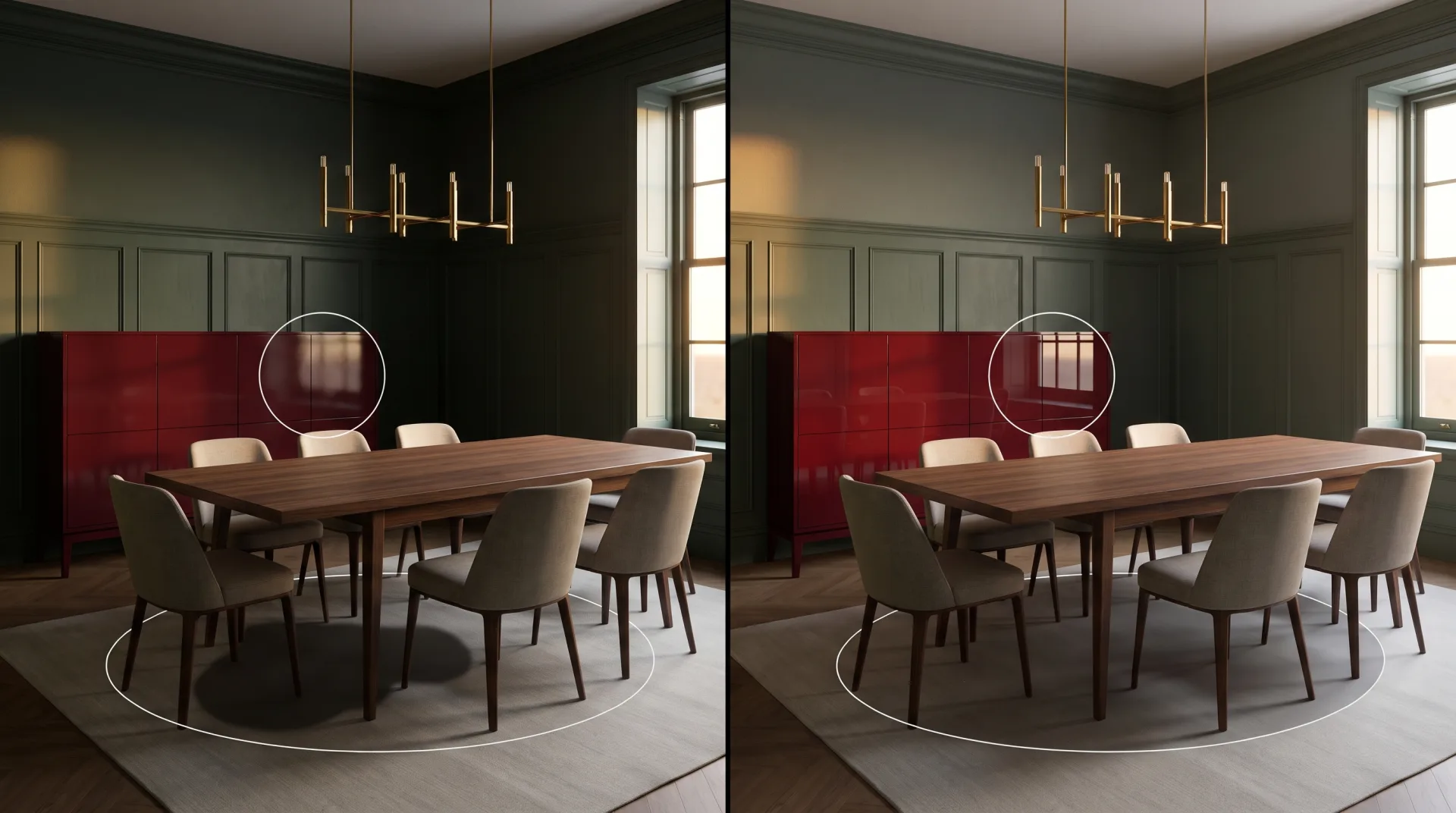
In the dining room above, the real-time half is perfectly usable for a design meeting. The offline half is what goes in a brochure: the soft shadow under the table, the window reflected in the lacquered sideboard and the even light in the far corner are what separate a preview from a photograph.
Is real-time ray tracing possible?
Real-time ray tracing is possible on GPUs with ray tracing hardware, which trace reflections, shadows and some bounced light while the rest of the image is rasterized. Consumer cards with dedicated ray tracing cores arrived with NVIDIA's GeForce RTX launch in September 2018, according to Wikipedia, and AMD and Intel cards now include the same kind of hardware. The trick is restraint: a real-time engine traces only a few rays per pixel and leans on denoising and upscaling. Our guide to the meaning of ray tracing explains the technique itself.
Is rendering CPU or GPU heavy?
Real-time rendering is GPU heavy, while offline rendering can run on either the CPU or the GPU depending on the engine. A real-time engine draws every frame on the graphics card, so the GPU decides how smooth a walkthrough feels; the CPU mostly prepares the scene. Offline engines differ. Corona renders entirely on the CPU, V-Ray comes as a CPU renderer and a separate V-Ray GPU engine, and Blender's Cycles renders on multi-core CPUs or on NVIDIA, AMD, Intel and Apple GPUs, as Blender's rendering page lists. The trade-offs in speed, memory and cost are set out in GPU vs CPU rendering.
What is real-time rendering used for in architecture?
In architecture, real-time rendering is used for design review, client walkthroughs, virtual tours, VR and fast preview images. Its value is that the design can change during the meeting: swap a facade material, move the sun, walk to a different room. Our comparison of real-time rendering software covers the tools architects use, and Unreal Engine has its own page for larger interactive projects.
| Use | Why real-time | Example output |
|---|---|---|
| Design review | The team can orbit the model and test options while the design is still changing | A live session inside Revit, SketchUp or Rhino through a real-time plugin |
| Client walkthrough | The client chooses where to walk instead of following a fixed camera | An interactive executable or a guided screen-share |
| VR | A headset must redraw both eyes many times a second as the head moves | A headset walkthrough of an apartment or showroom |
| Option studies | Materials, furniture or time of day can be switched instantly | A set of quick images comparing finishes |
| Preview images | A usable picture in seconds for early meetings | Concept stills before final rendering |
Which book is the standard reference on real-time rendering?
The standard reference is Real-Time Rendering, Fourth Edition, by Tomas Akenine-Möller, Eric Haines, Naty Hoffman, Angelo Pesce, Michał Iwanicki and Sébastien Hillaire, published in 2018. Real Time Rendering Fourth Edition became available in August 2018 from A K Peters/CRC Press and runs to 1,198 pages, according to its resource site, realtimerendering.com, which also collects links, errata and newer material. It is written for graphics programmers; an architect or developer does not need it to commission or judge a walkthrough.
When do we use real-time rendering for clients?
We use real-time rendering where a viewer must move freely through a building, as in a VR walkthrough, which we build in Unreal Engine 5 with Lumen lighting so it stays close to our stills, and offline rendering for marketing stills, animation and panoramas where every detail counts. We are a US 3D visualization company with a team trained in architecture and interior design, rendering for clients in the US and worldwide, and our main production renderers are Corona and V-Ray in 3ds Max, so stills, animation frames and 360 panoramas are path traced. Every 3D tour we make is built from those rendered panoramas, so each view keeps full bounced light and buyers can look around a home before it exists, while a free-roaming VR walkthrough lets a design team stand in a space at full scale and settle layout and finishes before anything is built. Where the camera path is fixed, a rendered film usually looks better than a real-time one, which is why most clients choose architectural 3D animation, with a first draft in 2 to 3 weeks. Our 3D rendering rates page lists every service.